

Online/Mobile Banking MFA Update
We take your online security seriously. Therefore, we are introducing a new security feature called Multi-Factor Authentication (MFA) on our Online/Mobile Banking site.
Q: What is multi-factor authentication?
A: Multi-factor authentication (MFA) is a security process requiring users to provide an extra layer of security, protecting Online and Mobile Banking 24/7. It helps guard against fraudulent login attempts like “Phishing” (malicious requests for your personal information) and identity theft.
Q: Why is MFA necessary?
A: With all types of fraud on the rise, multi-factor authentication adds an extra layer of security to your accounts, making it more difficult for unauthorized users to gain access. It is essential for sensitive information such as financial or other personal data.
Q: When will Online and Mobile Banking prompt for MFA?
A: On Tuesday, May 23, when you log into Online (browser) or Mobile (app) Banking, you will be prompted to receive a code based on your cell phone number or email on file. To ensure your information is current, we recommend you log into Online or Mobile Banking prior to May 23. To do this navigate to the upper menu (user icon in Online or hamburger menu in Mobile), next to Profile & Settings, then verify your information is correct or call 920.233.9096.
Q: How do I set up MFA?
A: With your cell phone number or email up-to-date, log into Online or Mobile Banking on May 23. The following pop-up steps with appear:
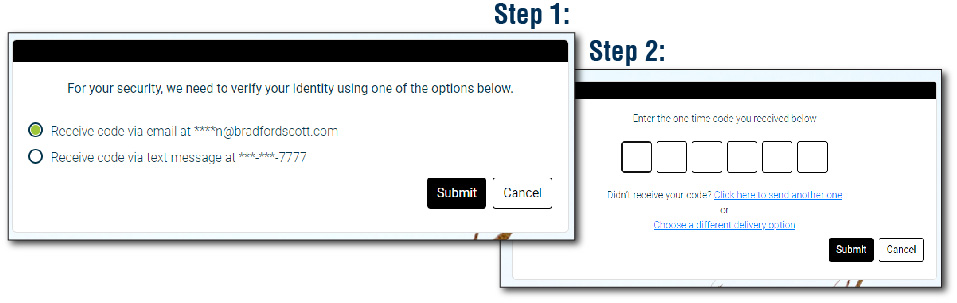
Follow the on-screen instructions to complete the process. You can also select 'Remember Device' to alleviate the process in the future.
Q: Will the MFA process be required every time you log in?
A: Not necessarily, if you select 'Remember Device' you would need only to do the MFA process for that first login.
Q: Does the process change for biometric identification (ex. face, fingerprint)?
A: Biometrics will only function to fill in username and password fields. Therefore, it will not bypass the MFA process. However, if you select 'Remember Device' you would need only to do the MFA process for the first login.
Q: What if I lose my authentication device?
A: If you lose your authentication device, you will need to go through the account recovery process to gain access to your account. It is important to keep the device safe and secure at all times.
Reminder: DO NOT give the code to anyone else. WinCU will NEVER ask for your codes or ANY personal information.